
GTC Garage
Behind Safat Homes, Shuwaikh Industrial, Kuwait  |  +965 2234 5678
๐Ÿ‘ค
โ€”
๐Ÿ” Search by vehicle plate, phone number, or chassis number to find a customer instantly.

Customer Quick Search

Type any vehicle number, phone number, or chassis to instantly find customer records.

๐Ÿš—
๐Ÿ‘ฅ
All Customers โ€” Recent First
๐Ÿ—‚๏ธ Job cards are work orders. Create one when a vehicle arrives, then generate an estimate from it.
Job Cards
๐Ÿ“„ Create bilingual estimates with labor + parts. Convert to invoice when approved.
Estimates
๐Ÿ“„
Estimate List
๐Ÿ“„

No Estimate Selected

Select an estimate to preview.

๐Ÿงพ View, print and manage invoices. Mark as paid or generate PDF.
๐Ÿงพ
Invoices
๐Ÿงพ

No Invoice Selected

Click an invoice to preview and print.

๐Ÿ“ฆ Manage parts inventory โ€” track stock, costs and supplier links.
๐Ÿญ Manage suppliers. Link to inventory and purchase orders.
Suppliers
#NameContactPhoneEmailTermsStatusActions
๐Ÿ“ˆ
Supplier Performance โ€” billing, actual payments, savings from post-bill discounts, and profit from parts sold
๐Ÿ“ˆ

Loadingโ€ฆ

๐Ÿ“‹ Create and manage purchase orders. Track from draft to received.
Purchase Orders
๐Ÿ“‹
PO List
๐Ÿ“‹

No PO Selected

Select a purchase order to preview.

๐Ÿ”ง Track work sent to outside vendors per invoice (chrome plating, paint, upholsteryโ€ฆ) โ€” what you paid vs what you charged the customer.
Outside Labour Work
to
๐Ÿ’ฐ Track income, expenses and profit & loss.
๐Ÿ“Š
Transaction History
DateDescriptionCategoryTypeAmount (KD)ุงู„ู…ุจู„ุบ
๐Ÿ“ˆ
Profit & Loss Summary
๐Ÿข Companies
๐Ÿ“Š Business Analytics
๐Ÿ“Š

Loading Analyticsโ€ฆ

๐Ÿข
Company Settings
๐Ÿ’ฐ
Purchase & Pricing
๐Ÿ—„๏ธ
Data Management

๐Ÿ’ก Export regularly as backup. Data stored in your browser. Connect to Laravel backend for cloud sync & multi-device access.

โ„น๏ธ
System Info
Customers
0
Job Cards
0
Invoices
0
Parts
0
Transactions
0
Version
v3.0
โž• New Job Card

๐Ÿ”
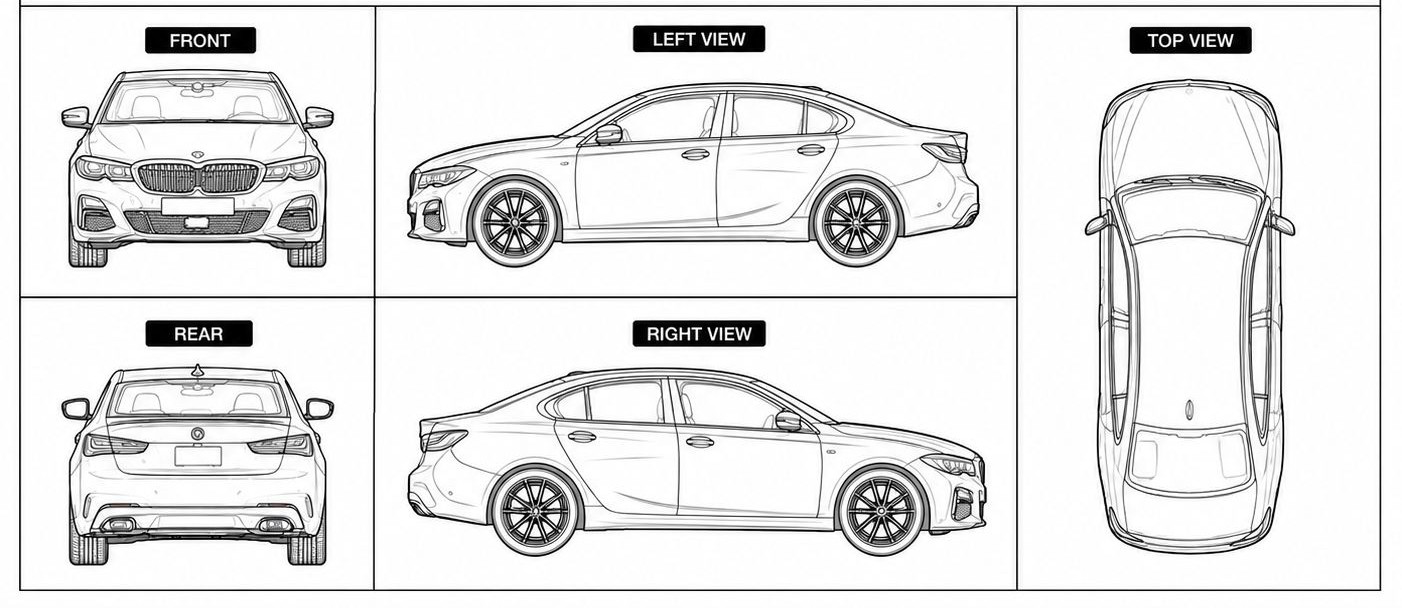
๐Ÿš— Vehicle Inspection  โ€” Click diagram to mark damage
Damage Type
Marked Damages

Click diagram to mark.

๐Ÿ“„ New Estimate

๐Ÿ”
๐Ÿ”ง Job Groups โ€” e.g. Oil Leak, Brake Job, each with its own labour charge
๐Ÿ”จ Labour Charges
KD 0.000ู .ู ู ู  ุฏ.ูƒ
๐Ÿ”ฉ Parts
KD 0.000ู .ู ู ู  ุฏ.ูƒ
Discount / ุฎุตู…
%KD
Net Amount (KD) โ€” overrides total
๐Ÿ’ณ GRAND TOTAL / ุงู„ุฅุฌู…ุงู„ูŠ
KD 0.000ู .ู ู ู  ุฏ.ูƒ
๐Ÿ’ฐ Profit (Parts)
KD 0.000

โœ๏ธ Edit Invoice

๐Ÿ‘ค Customer & Vehicle โ€” fix a typo'd phone/plate/VIN here without creating a new document
๐Ÿ”ง Job Groups โ€” e.g. Oil Leak, Brake Job, each with its own labour charge
๐Ÿ”จ Labor
KD 0.000
๐Ÿ”ฉ Parts
KD 0.000
Discount (KD)
Additional Discount (KD) โ€” extra, on top
Net Amount (KD) โ€” overrides total
๐Ÿ’ณ GRAND TOTAL / ุงู„ุฅุฌู…ุงู„ูŠ
KD 0.000

๐Ÿญ Add Supplier

๐Ÿ“ฆ Add Part

๐Ÿ“’ Item Ledger

โณ

Loadingโ€ฆ

๐Ÿ”— Fetch from RealOEM

Paste a RealOEM.com URL. The backend will fetch and pre-fill the part form. (Demo mode shows sample data.)

๐Ÿ“‹ New Purchase Order

๐Ÿ“ฆ Items

Enter the supplier's List Price and the Cost auto-calculates using your 30% supplier discount (editable per line if a part's discount differs).

DescriptionPart No.QtyList PriceCost (after disc.)
Total Purchase Cost: KD 0.000

๐Ÿ’ฐ Record Actual Payment

If the supplier gave a further discount when settling this bill, record what you actually paid โ€” the original PO value is kept for the record, and the difference is tracked as a saving.

Original PO ValueKD 0.000
SavingsKD 0.000

โž• Add Income / Expense

๐Ÿš— Vehicle Inspection

Click anywhere on the car diagram to mark a damage point.

Damage Type
Marked Damages

โž• Add New Customer

๐Ÿ’ณ Settle Pending Invoices

๐Ÿ”‘ Change Password

๐Ÿ’ณ Payment Method

Select how this invoice was paid:

๐Ÿ”— Link Generated

Select which admin shared the netbanking payment link with the customer:

๐Ÿ—’๏ธ Internal Remarks

Staff-only note about this customer/invoice (not printed, not visible to the customer) โ€” e.g. reason for last visit, follow-up needed, etc.

๐Ÿค Commission

Amount paid to whoever brought this customer (driver, referral, etc.) โ€” deducted from this invoice's profit in the Invoice Profit report. Not printed, not visible to the customer.

๐Ÿ“ท Invoice Photos โ€”

Upload photos for this invoice (e.g. damage, parts, receipts). Every uploaded photo is printed at the bottom of the invoice.

๐Ÿ”ง New Outside Labour Entry

๐Ÿ”
๐Ÿ”ง Work Items โ€” e.g. Chrome plating, paint job, upholstery sent to an outside vendor
Work NameCost (KD)Charged (KD)Profit
๐Ÿ’ธ Total Cost (paid to vendor)
KD 0.000
๐Ÿ’ฐ Total Charged (billed to customer)
KD 0.000
๐Ÿ“ˆ Profit
KD 0.000

๐Ÿ“‹ Collector Invoices

๐Ÿ“œ Customer History